Best Keyboard for Typing
Best Keyboard for Typing
Verdict: Best. Typing. Keyboard. Ever. — when you want a keyboard that disappears under your fingers.
Price range: $90–$220
Pros:
- Leopold FC750R: Wired TKL legendary build, PBT keycaps, perfect stabilizers
- HHKB HYBRID Type-S: 60% Topre switches, silent, Bluetooth, cult favorite
- Keychron K2 Pro: Wireless 75%, QMK/VIA, hot-swappable, best all-rounder
Cons:
- Leopold FC750R: Wired only, no wireless, no RGB
- HHKB HYBRID Type-S: Topre switches are polarizing, 60% layout isn’t for everyone
- Keychron K2 Pro: Plastic case vs. aluminum, QC lottery
Who should buy it: Writers, programmers, data entry clerks — anyone who types 6+ hours/day and wants a keyboard that gets out of the way.
Who should skip it: Gamers who need sub-1ms response times (get a wired gaming keyboard), or anyone who wants RGB and wireless luxury features.
What Makes a Great Typing Keyboard
Typing is different from gaming or casual use. You’re pressing the same keys thousands of times per day. The criteria change:
- Switch choice: Linear or tactile. Clicky is open-office liability. Heavy switches cause fatigue; light switches cause errors.
- Stabilizer quality: The #1 complaint on budget keyboards. Rattle, ping, and mushiness ruin long typing sessions.
- Keycap material: PBT keycaps develop a matte patina over time. ABS keycaps get shiny and greasy within months.
- Layout: TKL or 75% for desk space. Numpad users need 96% or full-size. 60% is for minimalists.
- Build material: Aluminum > thick plastic > thin plastic. A heavy keyboard doesn’t slide around.
Leopold FC750R — The Gold Standard
Amazon: Leopold FC750R — ~$120–$130
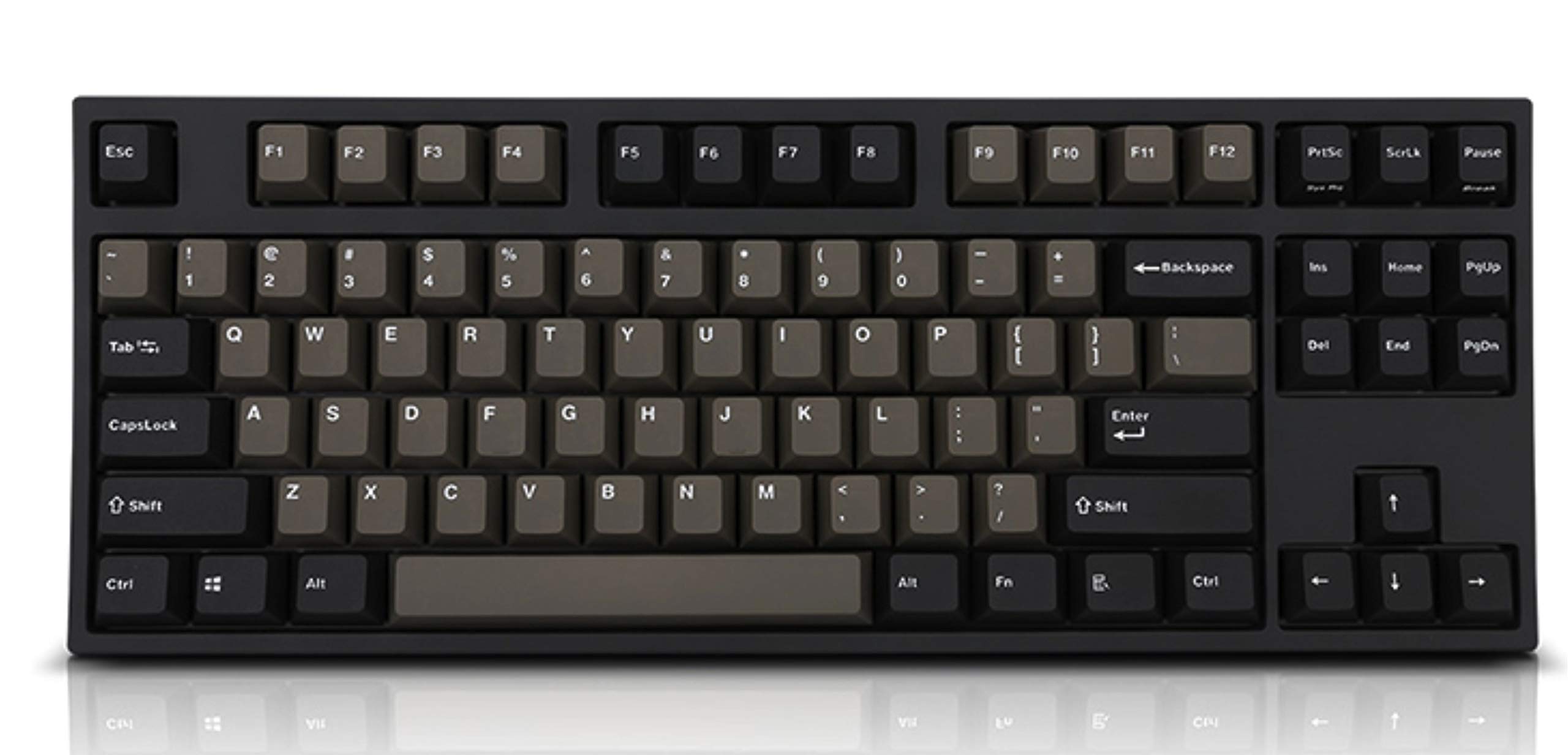
The FC750R is the keyboard that ruined all other keyboards for me. TKL layout, double-shot PBT keycaps, Cherry MX switches, and stabilizers so good they make budget keyboards cry.
Build: Thick plastic case, but it’s dense and heavy (~1kg). The keycaps are double-shot PBT — they will never shine, never fade, never feel greasy. The stabilizers are the best in the industry: no rattle, no ping, just smooth, consistent keystrokes.
Typing feel: Cherry MX Brown switches are the sweet spot — tactile enough to feel, quiet enough for open offices. The keycaps have a textured surface that grips fingertips. The actuation force is 45g, which is light enough for long sessions but heavy enough to prevent errors.
Software: None. What you see is what you get. No RGB, no macros, no software. This is a keyboard, not a peripheral ecosystem.
Who it’s for: Users who want a keyboard that works perfectly out of the box and will last 10+ years. No learning curve. No software to update. Just typing.
Verdict: Best. Wired. Typing. Keyboard. Ever. — for purists who value consistency over features.
HHKB Professional HYBRID Type-S — The Cult Favorite
Amazon: HHKB Professional HYBRID Type-S — ~$200–$220
The HYBRID Type-S is Happy Hacking Keyboard’s flagship. 60% layout, Topre electrostatic capacitive switches, Bluetooth connectivity, and a build quality that justifies its cult following.
Build: Plastic case, but it’s dense and well-molded. The keycaps are dye-sublimated PBT — permanent legends, never fade. The keyboard weighs 600g — light enough to travel, heavy enough to feel premium.
Typing feel: Topre switches are divisive. They’re not mechanical switches — they’re electrostatic capacitive. The actuation is smooth, consistent, and requires 45g of force. The “Type-S” variant has silenced stems for near-silent operation. If you type 100+ WPM, Topre switches will feel like typing on clouds.
Wireless: Bluetooth 5.0 + USB-C wired. The Bluetooth connection is stable for 2 devices. Battery life is 3+ months on AA batteries.
Layout: 60% with HHKB’s unique arrow key cluster (Fn + ;/J/K/L). The learning curve is real. The function row is accessed via Fn. The arrow keys require a key combo. This is not a keyboard for casual users.
Who it’s for: Programmers and writers who value typing feel above all else. The HHKB community is passionate for a reason.
Verdict: Best. Cult. Keyboard. Ever. — if you can handle the 60% layout and the price.
Keychron K2 Pro — Best All-Rounder
Amazon: Keychron K2 Pro — ~$90–$110
The K2 Pro is Keychron’s wireless 75% offering with QMK/VIA support and hot-swappable switches. It’s the keyboard I’d buy if I could only have one.
Build: Plastic case, aluminum frame. It’s lighter than Leopold or HHKB, but the build quality is solid. The keycaps are double-shot PBT — good enough for daily use.
Typing feel: Stock Gateron switches are decent. The stabilizers are… okay. Most users eventually swap to better switches or lube the stabilizers. The typing experience out of the box is good, not great.
Wireless: 2.4GHz + Bluetooth 5.1 + USB-C. The 2.4GHz connection is stable. Bluetooth works for 3 devices. Battery is 4000mAh — lasts 2–3 weeks with RGB off.
Software: QMK/VIA means full customization. Remap keys, build layers, macros. Settings persist on the board.
Who it’s for: Users who want wireless, customization, and a 75% layout without breaking the bank. The K2 Pro is the safe choice.
Verdict: Best. All-Rounder. Ever. — for anyone who wants a great typing keyboard without committing to a cult.
Alternatives Considered
| Product | Price | Best For | Verdict |
|---|---|---|---|
| Leopold FC750R | $120–$130 | Wired TKL, legendary build | Best wired typing |
| HHKB HYBRID Type-S | $200–$220 | 60% Topre, silent | Best premium typing feel |
| Keychron K2 Pro | $90–$110 | Wireless 75%, QMK/VIA | Best all-rounder |
| Keychron K8 Pro | $90–$110 | Wireless TKL, budget | Best value wireless |
| Ducky One 2 Mini | ~$80 | 60%, RGB, popular | Best beginner 60% |
Verdict
The Leopold FC750R is the keyboard I’d buy if I only typed at one desk and never needed wireless. It’s the gold standard for a reason: perfect stabilizers, PBT keycaps, and Cherry MX switches that just work.
The HHKB HYBRID Type-S is the keyboard I’d buy if I were a programmer who valued typing feel above all else and could handle the 60% learning curve.
The Keychron K2 Pro is the keyboard I’d actually buy — wireless, customizable, 75% layout, and under $110.
Bottom line: Buy the K2 Pro if you want wireless. Buy the FC750R if you want perfection wired. Buy the HHKB if you want to join the cult.
FAQ
Do I need to spend $200+ for a great typing keyboard? No. The Leopold FC750R at $120–$130 is better for pure typing than keyboards twice its price. The HHKB HYBRID Type-S at $200+ is for users who want Topre switches and Bluetooth — not because it’s objectively better for typing.
Are Topre switches worth the premium? Only if you’ve tried them and love them. Topre switches have a unique, smooth actuation that some typists swear by. But Cherry MX Browns or Gateron Browns at $120 are 90% as good for 20% of the price. Try before you buy.
Is a wireless keyboard good for typing? Yes, if it has 2.4GHz. The Keychron K2 Pro’s 2.4GHz connection is stable enough for typing. Bluetooth-only keyboards can have dropouts. For serious typing, get a keyboard with both 2.4GHz and Bluetooth, or stick to wired.
Disclosure: This post contains affiliate links. If you buy through these links, I may earn a commission at no extra cost to you.