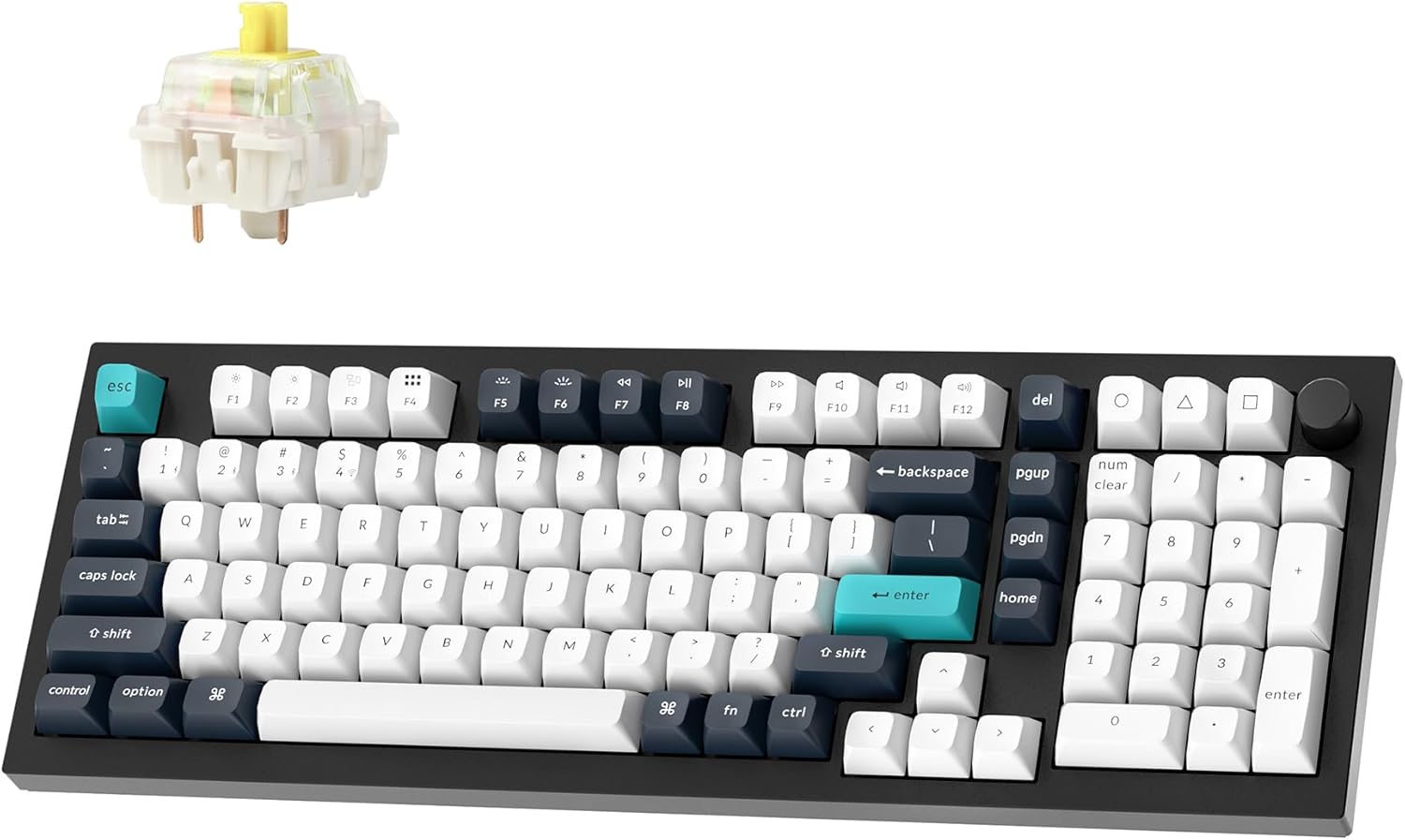
Best Mechanical Keyboard for Programming 2026
Best Mechanical Keyboard for Programming 2026
Verdict: Best. Keyboard. Ever. — for programmers who want wireless freedom without sacrificing build quality.
Price range: $90–$240 (three tiers covered)
Pros:
- Keychron Q5 Max: CNC aluminum body, 96% layout, 1000Hz wireless polling, QMK/VIA
- Keychron K8 Pro: World’s first out-of-the-box QMK/VIA wireless, hot-swappable, PBT keycaps
- Logitech MX Mechanical: Low-profile, multi-device Bluetooth, Logitech’s reliability track record
Cons:
- Keychron Q/V Max series: Documented QC issues — loose switches, double-key presses, spotty Bluetooth
- Logitech MX Mechanical: Not hot-swappable, low-profile switches polarize users
- All wireless boards: Battery dependency, occasional interference in crowded 2.4GHz environments
Who should buy it: Programmers who type 8+ hours/day and value wireless desk cleanliness.
Who should skip it: Gamers who need sub-1ms response times, or anyone who wants a keyboard that works perfectly out of the box without QC roulette.
The Programming Keyboard Criteria
A keyboard for programming isn’t just a keyboard. It’s your primary input device for 40+ hours per week. The criteria change:
- Layout: TKL (80%) or 96% saves desk space vs. full-size, but numpad users need it
- Switches: Tactile or linear for long typing sessions. Clicky = open office liability.
- Wireless: Non-negotiable for clean cable management. 2.4GHz > Bluetooth for reliability.
- Build: Aluminum > plastic. Durability matters when you’re typing 500,000 keystrokes per year.
Keychron Q5 Max — The Premium Choice
Amazon: Keychron Q5 Max — ~$220–$240
The Q5 Max is what happens when Keychron aims at the custom keyboard market and actually hits the target. Full CNC aluminum case, 96% layout (numpad without the wasted space), gasket-mounted design, double-shot PBT keycaps, and QMK/VIA support out of the box.
Typing feel: The gasket mount + aluminum case combo gives a muted, premium “thock” that makes code feel like it’s being typed on a $500 custom board. The stock Gateron Jupiter switches are decent — not spectacular, but serviceable until you hot-swap them.
Wireless: 2.4GHz + Bluetooth 5.1 + USB-C wired. The 1000Hz polling rate on 2.4GHz means this isn’t just a “typing” wireless board — it’s fast enough for gaming too.
The catch: Keychron’s Q/V Max series has a documented QC problem. Reddit threads are full of users reporting loose switches, double-key presses, and Bluetooth pairing failures. Keychron acknowledged manufacturing defects in early 2026 batches. If you buy one, test it immediately and return if anything feels off.
Verdict: Best. Keyboard. Ever. — when it works. But you’re rolling the QC dice.
Keychron K8 Pro — The Value Pick
Amazon: Keychron K8 Pro — ~$90–$110
The K8 Pro punched above its weight when it launched as the world’s first out-of-the-box QMK/VIA wireless keyboard. TKL layout (no numpad), aluminum frame, hot-swappable switches, and a 4000mAh battery that lasts weeks.
Typing feel: Solid, but the stock stabilizers are rattle-prone. Budget-level acoustics out of the box. Fixes with lube — or just swap to Gateron Browns/Reds.
Software: QMK/VIA means full key remapping, layers, and macros. No cloud accounts, no bloatware.
Who it’s for: Programmers on a budget who still want wireless and customization. The K8 Pro is the sweet spot.
Logitech MX Mechanical — The Safe Choice
Amazon: Logitech MX Mechanical — ~$150–$180
Logitech’s answer to the mechanical keyboard for office/productivity users. Low-profile keys, three switch options (Tactile Quiet, Clicky, Linear), and Easy-Switch technology for up to 3 devices.
Typing feel: The low-profile switches are… divisive. If you’ve spent years on full-travel mechanical switches, these will feel shallow and odd. But if you’re coming from a MacBook keyboard, they’ll feel like an upgrade.
Build: Metal top plate, plastic base. Feels premium but not “custom keyboard” premium.
Software: Logitech Options+ is functional but requires an account and installs background services. Not everyone’s cup of tea.
Who it’s for: Programmers who want wireless mechanical without the enthusiast learning curve. It just works.
Alternatives Considered
| Product | Price | Best For |
|---|---|---|
| Keychron Q5 Max | $220–$240 | Premium wireless, numpad needed |
| Keychron K8 Pro | $90–$110 | Best value, TKL layout |
| Logitech MX Mechanical | $150–$180 | Safe, mainstream, multi-device |
| Keychron K3 Pro | ~$100 | Low-profile, ultra-portable |
| Leopold FC750R | ~$130 | Wired only, legendary build quality |
Verdict
The Keychron K8 Pro is our top pick for most programmers. It hits the sweet spot of price, features, and wireless reliability. The Q5 Max is tempting — that aluminum case is gorgeous — but the QC issues make it a gamble. The Logitech MX Mechanical is the safe corporate choice, but you’re paying for brand, not enthusiast features.
Bottom line: Buy the K8 Pro. If you need a numpad, get the Q5 Max but open it carefully and test every key before you commit.
FAQ
Is the Keychron Q5 Max worth it in 2026? Only if you need the numpad and aluminum case. The Q5 Max is genuinely excellent when the QC is good, but Keychron’s Q/V Max series has a documented defect rate in early 2026 batches. Buy from Amazon (easiest returns) and test every key within the return window.
Is Bluetooth good enough for programming? No. 2.4GHz wireless with 1000Hz polling is the standard. Bluetooth is fine for casual typing, but in a Wi-Fi-dense office, you’ll get dropouts. The Q5 Max and K8 Pro both support 2.4GHz dongles. The Logitech MX Mechanical is Bluetooth-only, which is a downside for reliability.
Do programmers really need hot-swappable switches? Yes. If you type 8+ hours/day, you’ll eventually want to try different switches. Hot-swap means no soldering, no downtime. The K8 Pro and Q5 Max are both hot-swappable. The Logitech MX Mechanical is not.
Disclosure: This post contains affiliate links. If you buy through these links, I may earn a commission at no extra cost to you.